Introduction
The example in this document uses, as noted below, the kennedy repository supplied with the AllegroGraph distribution and discussed in the AllegroGraph Quick Start document. There is a second example of this feature in the AllegroGraph.cloud document using the olympics repository which is preloaded in the AllegroGraph.cloud server. (The kennedy repo is not preloaded.)
The Natural Language SPARQL Queries (NLQ) feature in AllegroGraph leverages the power of vector databases (VDBs) to map human-readable natural language queries into precise SPARQL queries. This feature makes it easier for users to interact with data in a semantic graph without needing extensive knowledge of SPARQL, opening up possibilities for non-technical users to query the system using everyday language.
AllegroGraph also supports another form of natural language querying: ChatStream and Chatbots (see Natural Language query to Knowledge Graph).
This document introduces a new feature: typing a natural language query directly into the SPARQL query page in WebView.
Doing this, however, does require some setup. You will need to create an NLQ (Natural Language Query) VDB (Vector DataBase). An NLQ VDB is a specialized vector database that stores pairs of natural language queries and their corresponding SPARQL queries. This VDB is associated with its corresponding AllegroGraph triple store via NLQ VDBs registry and acts as a repository of mappings between how users might ask a question in natural language and how that query should be expressed in SPARQL. As more mappings are stored, the NLQ VDB becomes increasingly adept at translating user queries into accurate SPARQL queries.
AllegroGraph provides tools which assist in creating the NLQ VDB. See the example below which shows how you can get quite far just using the default tools.
Using SHACL in NLQs
SHACL (the Shapes Constraint Language, see the SHACL document) is a crucial part used in defining the structure and constraints of the data within a graph database. AllegroGraph uses SHACL shapes as a guide for generating correct SPARQL queries based on natural language input. (A standard use of SHACL is for database validation -- verifying, for example, that every instance of employee has at least one phone-number and exactly one salary. But SHACL has many more uses, as this document shows.)
Why SHACL Matters: SHACL shapes ensure that the generated SPARQL queries conform to the structure of the data in the triple store. If SHACL constraints are not accurately defined, the system may generate incorrect SPARQL queries, leading to suboptimal results or query failures.
Best Practices: Users should ensure that the SHACL shapes accurately reflect the structure and rules of the data in the triple store. Therefore once things are set up, they should periodically review and update SHACL shapes to maintain high accuracy in the query generation process.
Improving the Quality of Results: Users can improve the quality of the natural language to SPARQL translation by:
Expanding the NLQ VDB: Continuously store more pairs of natural language queries and their corresponding SPARQL queries that are specific to the dataset and schema of the triple store. This helps the system learn more mappings and improves the precision of query generation.
Refining SHACL Shapes: Regularly update the SHACL shapes to reflect changes in the data structure, ensuring that the system generates SPARQL queries that are both accurate and efficient.
Implementing Feedback Mechanisms: Incorporating user feedback on the accuracy of the generated SPARQL queries can help refine the system’s learning process.
By following these guidelines, users can ensure that AllegroGraph’s natural language to SPARQL feature generates accurate and contextually appropriate queries.
Terse CPT Schema format
While SHACL description of a repository provides a detailed schema for constructing SPARQL queries, SHACL shapes are expressed as RDF graph, and the textual representation of this graph in one of the concrete RDF syntaxes is too verbose for LLM purposes from the point of view of the token count. AllegroGraph provides a custom format called Terse CPT Schema or Terse Class-Path-Type Schema that encodes most important SHACL shape information in a terse structure represented as a JSON document. The document consists of two fields: prefixes and classes.
{
  "prefixes": {
    "xsd": "<http://www.w3.org/2001/XMLSchema#>",
    "ex": "<http://example.org/>"
  },
  "classes": {
    "ex:Book": {
        "ex:title": "^^rdf:langString",
        "ex:hasAuthor": "ex:Person",
        "ex:references": "<*>"
    },
    "ex:Person": {
        "ex:firstName": "^^xsd:string",
        "ex:lastName": "^^xsd:string",
        "ex:owns": "ex:Book"
    }
  }
}
The prefixes value is a JSON object whose fields are namespace abbreviation definitions, similar to JSON-LD @context object. Each filed name in the object is a prefix name, and its value is a prefix expansion IRI:
"prefixes": {
  "rdf": "<http://www.w3.org/1999/02/22-rdf-syntax-ns#>",
  "xsd": "<http://www.w3.org/2001/XMLSchema#>",
  "owl": "<http://www.w3.org/2002/07/owl#>",
  "sh": "<http://www.w3.org/ns/shacl#>",
  "skos": "<http://www.w3.org/2004/02/skos/core#>",
  "dcterms": "<http://purl.org/dc/terms/>",
  "": "<http://franz.com/ns/keyword#>",
  ...
}
The classes value is a JSON object whose fields represent classes. The field name is an IRI denoting class name, and the field value is a class properties object:
"classes": {
  ":Book": { ... },
  ":Person": { ... },
  ":Author": { ... },
  ...
}
Class properties object's fields represent properties of a given class. In the simple case the field name is a just a property IRI, but it can also be a SHACL property path represented in a terse SPARQL property path syntax:
":Person": {
  ":firstName": "^^xsd:string",
  ":lastName": "^^xsd:string",
  ":nickname|:username": "^^xsd:string",
  ":worksAt/:locatedIn" ":City",
  ":knows|(^:knows)": ":Person",
  ":memberOf*": ":Organization",
  ...
}
CPT Schema format uses the N3 notation for IRIs, so IRIs can be written in the abbreviated form ns:local and in the expanded form <http://example.org/local>:
"<http://example.org/Person>" {
  "<http://example.org/firstName>": "^^<http://www.w3.org/2001/XMLSchema#string>",
  ...
}
The values of the fields in the class properties object represent expected types of values at corresponding paths. CPT Schema format supports several kinds of type notations:
- A simple IRI denotes a value which is an instance of a given class:
- A literal marker
^^followed by an IRI denotes a literal of a given datatype: - A set of special markers
<*>("any IRI"),_:*("some blank node") and^^*("a literal of any type"), corresponding to SHACL'ssh:nodeKindproperty valuessh:IRI,sh:BlankNodeandsh:Literalrespectively, as well as*("any value"); the example below specifies that theex:referencesproperty can have any IRI value,ex:publication- some blank node,ex:summary- literal of any datatype, andex:metadata- any value at all: - A JSON array of values described in 1-3, denoting "any of the following", which corresponds to SHACL's property shape level
sh:orproperty; the example below specifies that the value of the:publicationTimeproperty can be anxsd:dateTimeliteral, anxsd:dateliteral or an instance of class:Timestamp:
":Person" {
  ":spouse": ":Person",
  ...
} ":Book" {
":title": "^^rdf:langString",
":publicationDate": "^^xsd:date",
...
} ":Book" {
"ex:references": "<*>",
"ex:publication": "_:*",
"ex:summary": "^^*",
"ex:metadata": "*",
...
} ":Book" {
":publicationTime": ["^^xsd:dateTime", "^^xsd:date", :Timestamp],
...
} The main AllegroGraph HTTP services which support this format are SHACL shapes API services. In order to retrieve the CPT Schema of the repository, the application/vnd.franz.terse-cpt-schema+json media type has to be requested:
curl http://user:pass@localhost:10035/repositores/books/shacl-shapes \
     -H 'Accept: application/vnd.franz.terse-cpt-schema+json'
Note that for brevity purposes AllegroGraph's CPT Schema serialization function will only include a namespace definition in the prefixes object if it is used by any IRI in the classes object.
A simple example
The AllegroGraph Quick Start introduces the kennedy database (of members of the family of President John F. Kennedy) as a simple starting example. We will use that example here to show how quickly you can start using Natural Languange queries.
The ntriples file kennedy.ntriples is available in the tutorial directory located in this subdirectory of the Franzinc allegrograph-examples github site. Create a kennedy repo and load the kennedy.ntriples into it (follow the instructions in AllegroGraph Quick Start is necessary).
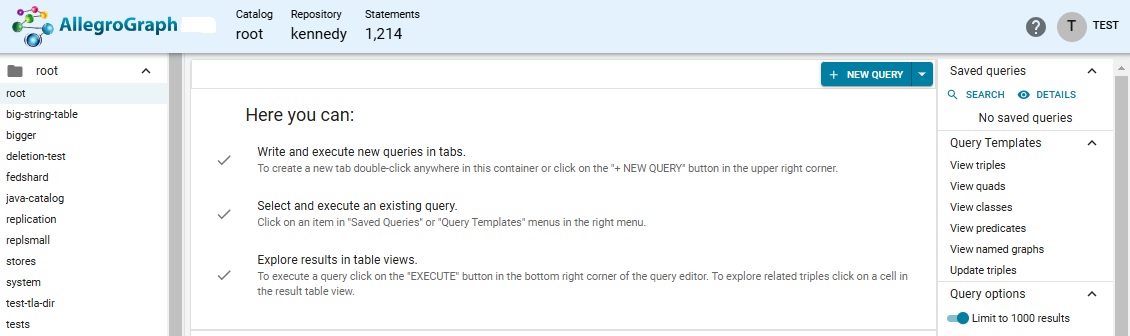
Here is what WebView looks like with the kennedy repo loaded and open.
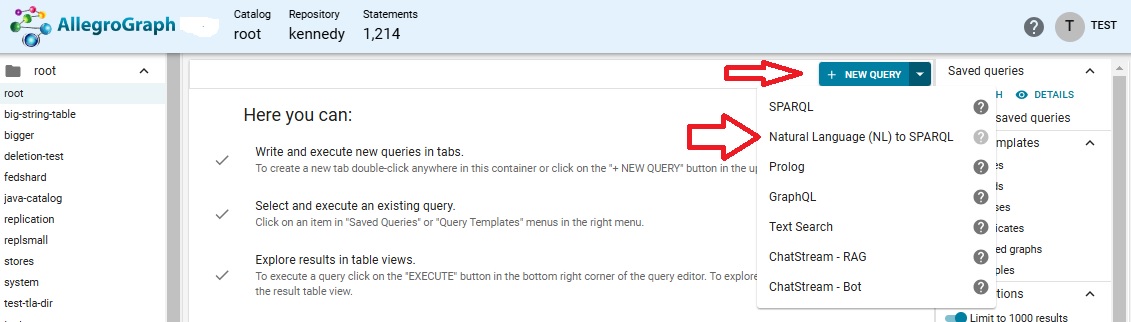
Display the New Query menu and choose Natural Language (NL) to SPARQL.
Since there is no associated NLQ Vector DataBase (VDB) associated with the kennedy repo one will have to be created. This can be done automatically. We have selected openai as the Embedder and chosen a model and supplied our OpenAI key, and also selected the two options about data agnostic and taxonomy queries.
Note: NLQ VDB registry is a soft mapping. It is used in WebView for suggesting which NLQ VDBs are available for each triple store, but does not prevent the user from using any other VDBs at their own risk.
Note: prior to AllegroGraph v8.5.0 version, NLQ VDBs registry was a separate triple store called nlq-to-triple-store-mapping. This has been changed in AllegroGraph v8.5.0. When AllegroGraph v8.5.0 server is started on top of older version data directory, the registry will be automatically migrated to the new storage and the user will be notified via a server warning. If any issues are encountered after the migration, please go to Repository Control / Manage Natural Language Queries (NLQ) VDBs and use the ATTACH EXISTING VDB dialog to manually fix the registry.
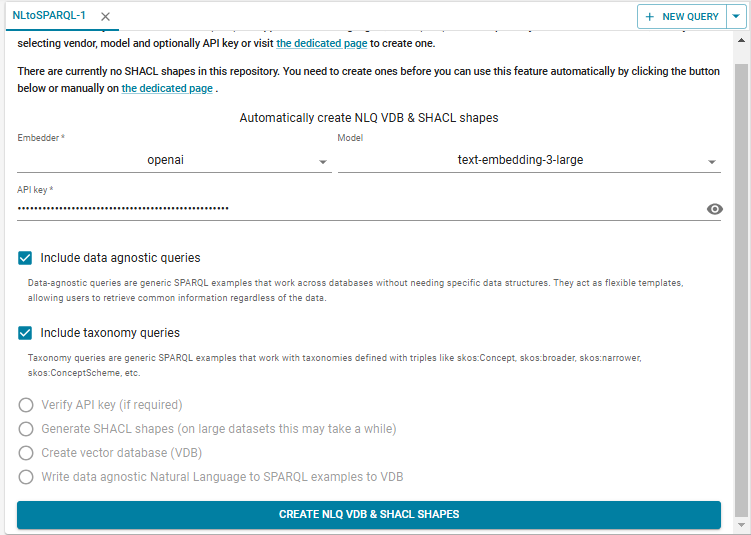
Click CREATE NLQ VDB & SHACL SHAPES. The database is created (named kennedy-nl-BcdNj, shown under NLQ VDB to use in the upper right).
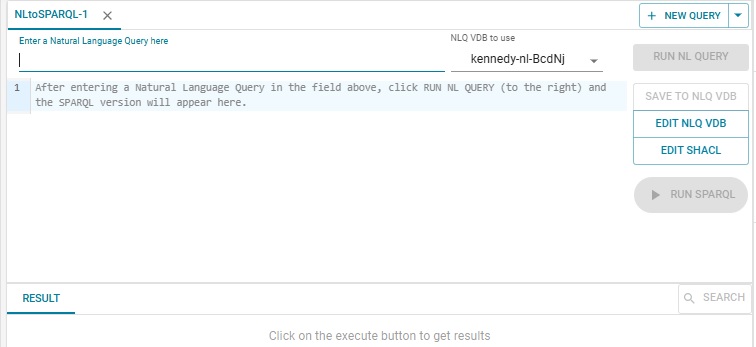
You enter your NL query where the prompt labeled Enter a Natural Language Query here. When you do the Run NL Query button on the right will become active. We entered "Tell me about Joseph Kennedy." and here is the result:
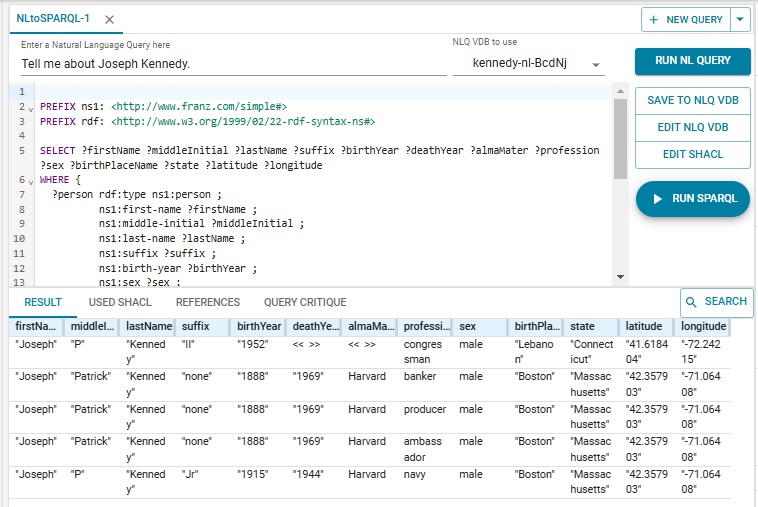
There are several persons in the database named "Joseph Kennedy" and all are listed along with what is known about them. Joseph Patrick Kennedy, the family patriarch, born in 1888, has 3 lines as he had three professions (producer, banker, and ambassador). Note that "Tell me about Joseph Kennedy." is not strictly speaking a question, but the system interpreted it correctly and responded as desired.
Now we ask "Which person was president?" and we do not get any answers:
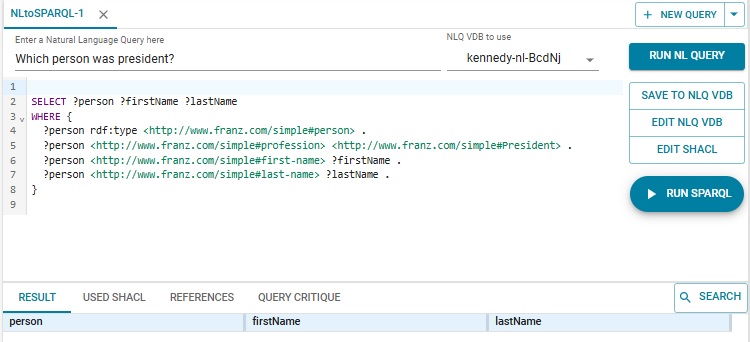
The problem is President is capitalized as the profession while it is not in the database. We edit the generated SPARQL to use president, click Run SPARQL, and get the expected response:
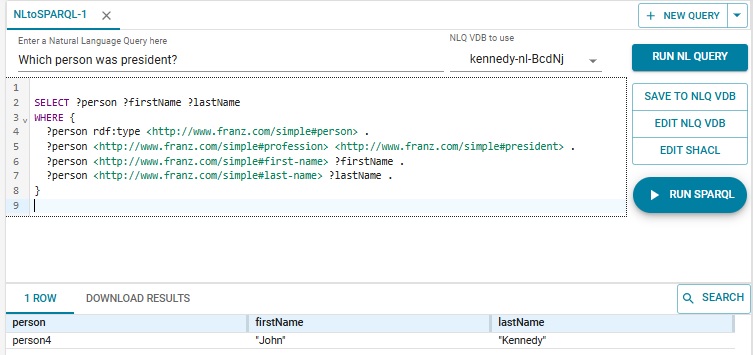
Note that what behavior you see is not deterministic so you may not see exactly what we report here if you follow the same steps.
Updating the NLQ VDB
Now we like the SPARQL query generated with the lower case so we want to save the NL query and the generated SPARQL so it can be used as a template for later queries.
To the right are buttons SAVE TO NLQ VDB, EDIT NLQ VDB, and EDIT SHACL. Click on SAVE TO NLQ VDB so the "Which person was president?" NL query is saved along with the (corrected) SPARQL query. Then click on EDIT NLQ VDB and all the saved NL queries and their associated SPARQL queries are displayed. There are many generated examples by the system. You can apply either SUBSTRING case-sensitive search across values in NL query, SPARQL query, Created By, and Edited By fields. If you don't remember specific words in a natural language query, you could try NEAREST NEIGHBOR search to use embedding-based search to match the semantics of words defined by LLM, not the words themselves. You can also change the examples layout from table to list view by picking the appropriate item in the Examples layout select.
Note: Created By, Created At, Edited By, Edited At are new fields introduced in AllegroGraph 8.4.0. Therefore if you've created examples in NLQ VDB using an earlier version those fields would be empty and filled only on edit.
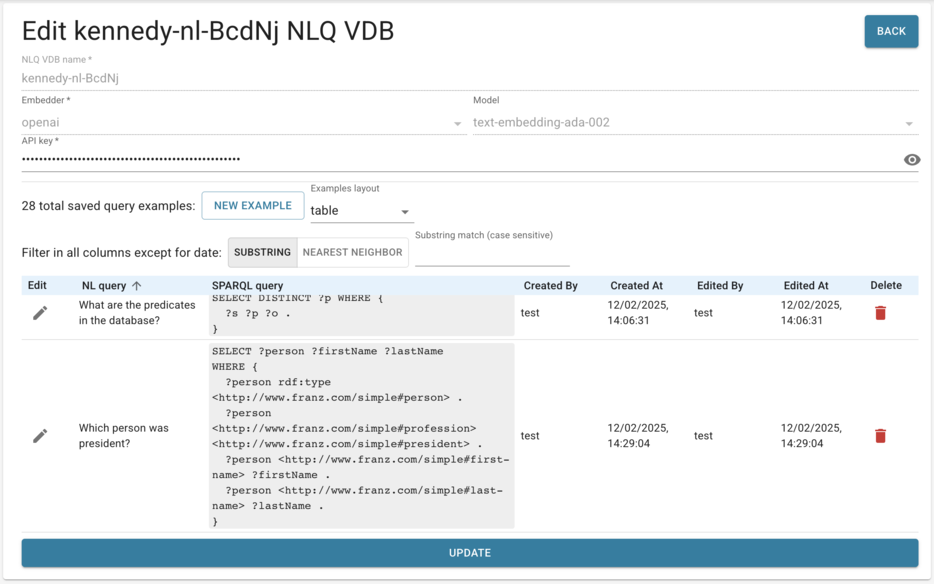
Now let us add one template ourselves. On the Edit kennedy-nl-BcdNj NLQ VDB page we want to add the NL query "Who was president?" and associate it with this SPARQL:
SELECT ?person
WHERE {
  ?person rdf:type <http://www.franz.com/simple#person> .
  ?person <http://www.franz.com/simple#profession> <http://www.franz.com/simple#president> .
}
Click on NEW EXAMPLE, enter the NL query and the SPARQL query, and click UPDATE (at the bottom). Now when we ask "Who was president?" that is the SPARQL we get.
Updating SHACL
There are SHACL shapes generated by the system based on characteristics of the repository. These can be viewed and edited, or new shapes added by clicking on the EDIT SHACL BUTTON.
We Welcome Your Feedback
The Natural Language SPARQL Queries feature described in this document is in active development. It is being tested extensively, but natural language questions may have many different phrasings and testing by just a few people may bias a tool toward their way of speaking and writing. We are hoping for extensive feedback from users to tell us what works well and what needs improvement. Feedback on what works and what does not is needed to polish the feature. Please do send comments and suggestions to [email protected].